ElysiaJS vs Minimal API
ElysiaJS is not Express. It is Bun-first, built on Web Standards (Request and Response, the WinterTC family of APIs), and expects you to describe routes with schemas so that validation, OpenAPI, and client types all come from one definition. In day-to-day feel, it is much closer to a .NET Minimal API than Express is.
Unlike Express or Nest.js on Node.js, this is the first comparison in this guide where the TypeScript side holds its own on raw HTTP/1.1 throughput. The real trade-off shifts from raw speed to steady-state CPU and memory, threading model, and runtime type metadata. We'll pair Minimal APIs with Carter, a thin library that adds module-based routing over Minimal APIs, because it is the closest .NET match for how Elysia composes routes.
If you're already on Bun
If your team is already running Elysia on Bun, you won't feel the same throughput bottleneck that pushes Express or Nest.js teams toward .NET. The case for .NET here is steady-state CPU and memory, shared-memory threads, protocol breadth (HTTP/2, HTTP/3, gRPC), and type metadata that exists at runtime.
Setting Up
# Bun + Elysia setup
bun create elysia elysia-app
cd elysia-app

# Run and watch for file changes
bun dev # ✅ Ready!# .NET Minimal API + Carter setup
dotnet new webapi --no-https
dotnet add package Carter
dotnet add package Scalar.AspNetCore
# Run and watch for file changes
dotnet watch --non-interactiveBecause Elysia builds on Web Standards, it isn't locked to Bun. There is a Node.js adapter (@elysiajs/node), and since the app exposes a standard fetch handler, Deno works too:
// Node.js
import { node } from "@elysiajs/node";
const app = new Elysia({ adapter: node() });

// Deno
Deno.serve(app.fetch);
Bun is still the primary target: it runs .ts files directly (no tsc, no tsx, no build step), which keeps the setup short.
Source code
💡 The source code for this walkthrough is available in GitHub for .NET + Carter and for Elysia.
Entry Point and Routing
Here is the same API surface on both sides: a plain text GET / and a typed GET /increment/:count?by=1:
import { Elysia, t } from "elysia";

const app = new Elysia()
  .get("/", () => "Hello, World!")
  .get(
    "/increment/:count",
    ({ params, query }) => ({
      count: params.count + (query.by ?? 1),
    }),
    {
      params: t.Object({
        count: t.Integer(),
      }),
      query: t.Object({
        by: t.Optional(t.Integer()),
      }),
    }
  )
  .listen(3003);

// /increment/41?by=1 -> { "count": 42 }var builder =
WebApplication.CreateBuilder(args);
var app = builder.Build();
app.MapGet("/", () => "Hello, World!");
app.MapGet(
"/increment/{count:int}",
(int count, int by = 1) =>
TypedResults.Ok(
new IncrementResult(count + by)
)
);
app.Run();
record IncrementResult(int Count);
// /increment/41?by=1 -> { "count": 42 }Notice two details. First, Elysia chains: every .get() returns a new Elysia type carrying that route, which is how types flow to the client later. Second, URL parameters arrive as strings on the wire, so Elysia relies on t.Integer() to coerce "41" into 41. In C#, the int parameter in the handler signature handles that automatically.
What happens with /increment/asdf?
Elysia returns a 422 because the params schema fails. The .NET route above returns a 404 because the :int constraint prevents the route from matching. Drop the :int and .NET returns a 400 instead (the route matched, then parameter binding failed). Same input, three different status codes -- pick one convention and document it.
Validating Requests
Both frameworks validate at the request boundary and reject invalid payloads before the handler runs. The difference is where the rules live:
import { Elysia, t } from "elysia";

const Candidate = t.Object({
  email: t.String({ format: "email" }),
  yoe: t.Integer({
    minimum: 0,
    maximum: 50,
  }),
});

new Elysia().post(
  "/candidates",
  ({ body, status }) => status(201, body),
  { body: Candidate } // 👈 422 on error
);using System.ComponentModel.DataAnnotations;
// 👇 Turn on once at startup
builder.Services.AddValidation();
app.MapPost("/candidates",
(Candidate c) =>
TypedResults.Created("/candidates", c)
);
record Candidate(
[property: EmailAddress] string Email,
[property: Range(0, 50)] int Yoe
);Elysia uses TypeBox by default and also accepts any Standard Schema library (Zod, Valibot), so you can reuse existing schemas. The schema is the source of truth and the static type is derived from it (Static<typeof Candidate>). In C# it works the other way around: the record is the type and the attributes decorate it. Elysia avoids most of the "ancillary models" problem from the intro because you write the schema once, though it is still a runtime schema paired with a derived type rather than a type that carries its own metadata.
422 vs 400
A failed schema check in Elysia returns 422. A failed validation in ASP.NET Core 11 returns 400 with ValidationProblemDetails. If you are migrating behind an existing client, check which status code the client expects. Carter also includes an optional FluentValidation integration (MapPost<T>) that returns 422, so on .NET you can match either convention.
.NET 11 also adds async validation for minimal APIs for rules that hit a database (see Express vs Minimal API). In Elysia you run that check in a beforeHandle hook, shown below.
Modules, Services, and Dependency Injection
Real backends don't live in one file. Elysia's unit of composition is another Elysia instance plugged in with .use(). Carter's is a class implementing ICarterModule. Here is a health module on both sides:
// 📄 modules/health.ts
const HealthSchema = t.Object({
  now: t.String(),
  serverName: t.String(),
});

const healthService = {
  getStatus: () => ({
    now: new Date().toISOString(),
    serverName: hostname(),
  }),
};

export const healthModule = new Elysia()
  .model("HealthStatus", HealthSchema)
  .decorate("health", healthService) // 👈
  .get(
    "/health",
    ({ health }) => health.getStatus(),
    {
      detail: {
        tags: ["Health"],
        summary: "Health Status",
      },
      response: "HealthStatus",
    }
);// 📄 Modules/HealthModule.cs
public record HealthStatus(
DateTimeOffset Now,
string ServerName
);
public class HealthService {
public HealthStatus GetStatus() =>
new(DateTimeOffset.UtcNow,
Environment.MachineName);
}
public class HealthModule : ICarterModule {
public void AddRoutes(
IEndpointRouteBuilder app
) {
app.MapGet("/health",
(HealthService health) =>
TypedResults.Ok(health.GetStatus())
)
.WithTags("Health")
.WithSummary("Health Status");
}
}Notice how the response shape reaches OpenAPI: in Elysia you register the TypeBox schema with .model(...) and attach response: "HealthStatus"; in C#, HealthStatus plus TypedResults.Ok(...) emits the schema automatically.
Wiring the modules into the application takes one line per module on each side:
// 📄 app.ts
export const app = new Elysia()
  .use(openapi())
  .get("/", () => "Hello, World!")
  .use(healthModule)
.use(candidatesModule);// 📄 Program.cs
builder.Services.AddCarter();
builder.Services
.AddSingleton<HealthService>();
builder.Services
.AddSingleton<CandidateFormatter>();
var app = builder.Build();
app.MapGet("/", () => "Hello, World!");
app.MapCarter(); // 👈 Maps ICarterModulesThe service lifetime model is where they diverge:
- Elysia has no DI container.
.decorate()attaches a value to the context for every route in the module (effectively a singleton),.state()provides a mutable store, and.derive()/.resolve()compute values per request (before and after validation, respectively). Types are inferred with minimal boilerplate, though scoped lifetimes are up to you to manage. - .NET has a built-in DI container with
Singleton,Scoped, andTransientlifetimes, and handler parameters are injected by type. More registration up front, with explicit lifetime control.
If ICarterModule looks familiar, it is the packaged version of the IEndpoint + IEndpointHandler + Scrutor pattern in Interface with the Backend?, with assembly discovery already built in. Use the hand-rolled version when you want zero dependencies, or Carter when you want less boilerplate to maintain.
Lifecycle Hooks vs Middleware and Filters
Elysia exposes a fixed request lifecycle that you hook into. .NET has middleware for the application pipeline and endpoint filters for individual routes and groups. They map like this:
| Elysia | .NET |
|---|---|
onRequest | Middleware (app.Use(...)) |
onParse | Custom binding (BindAsync) |
onTransform | Middleware |
onBeforeHandle | IEndpointFilter short-circuit, or authorization |
onAfterHandle | IEndpointFilter (code after await next(ctx)) |
onError | UseExceptionHandler() / IExceptionHandler |
.guard(...) | MapGroup(...).AddEndpointFilter(...) / .RequireAuthorization() |
Here is the /candidates module. It stamps an X-Module header on every response from the group and short-circuits with a 409 when the email is ada@example.com:
export const candidatesModule =
  new Elysia({ prefix: "/candidates" })
    .decorate("formatter", fmt)
    // 1. Stamp group response header
    .onAfterHandle(({ set }) => {
      set.headers["X-Module"] =
        "candidates";
    })
    .post(
      "/",
      ({ body, formatter, status }) =>
        status(201, formatter.format(body)),
      {
        body: CandidateSchema,
        // 2. Guard taken email
        beforeHandle: ({ body, status }) => {
          if (body.email === "ada@example.com") {
            return status(409, {
              error: "Email is already taken.",
            });
          }
        },
      }
);public class CandidatesModule
: ICarterModule {
public void AddRoutes(
IEndpointRouteBuilder app
) {
var group = app
.MapGroup("/candidates")
.AddEndpointFilter(async (ctx, next) => {
// 1. Stamp group response header
ctx.HttpContext.Response
.Headers["X-Module"] = "candidates";
Hooks are local by default
Hooks declared in an Elysia plugin apply only to that plugin's routes, which is why GET / does not carry X-Module: candidates. Call .as("scoped") or .as("global") when a hook needs to reach the parent app. It can surprise developers coming from Express, though local-by-default is a safer default than global middleware leaking across unrelated routes.
The Elysia version reads cleanly because the guard sits directly alongside the route it protects. The inline C# filter works, though GetArgument<Candidate>(0) looks up the bound argument by position; for strict type safety, implement a dedicated IEndpointFilter class.
OpenAPI and End-to-End Type Safety
Both stacks generate an OpenAPI document and serve a Scalar interactive API reference in a couple of lines. The difference is how client types get generated:
// 📄 app.ts (keep one chained expression)
export const app = new Elysia()
  .use(setupHttp) // 👈 Scalar at /scalar
  .use(healthModule)
  .use(candidatesModule);

export type App = typeof app;

// 📄 client.ts
import { treaty } from "@elysiajs/eden";
import type { App } from "./app";

const api = treaty<App>(
  "http://localhost:3003"
);

await api.health.get();
await api.increment({ count: 41 })
  .get({ query: { by: 1 } });
await api.candidates.post({
  email: "charles@example.com",
  yoe: 12,
});// 📄 Program.cs
builder.Services.AddOpenApi();
app.MapOpenApi(); // 👈 /openapi/v1.json
app.MapScalarApiReference(); // 👈 /scalar
// TypedResults + records feed the spec
app.MapGet("/health",
(HealthService health) =>
TypedResults.Ok(health.GetStatus())
);
// 👉 Generate TS bindings from the spec
// with Kubb (see link below)Eden Treaty is Elysia's standout feature. There is no codegen step: the client imports the type of the server, and every route, parameter, and response is checked by tsc. Rename a field on the server and the client stops compiling immediately.
Eden needs the server's types
Eden only works when the client can import typeof app. That requires a TypeScript monorepo or a shared types package, and the app must be built as a single chained expression (calling app.get(...) on a separate statement drops the accumulated route types). Mobile clients, Go services, or external partners still fall back to OpenAPI.
On the .NET side, the OpenAPI document is the contract, and Scalar.AspNetCore gives you the same interactive docs UI at /scalar. Our Interface with the Backend? guide walks through generating TypeScript clients from that spec with Kubb. It adds a codegen step compared to Eden, and works for any client language.
Exporting the OpenAPI Schema
When you have non-TypeScript consumers (or want to commit the spec in CI), both stacks can emit openapi.json without booting a live server:
// 📄 setup/setup-http.ts
export const openApiDocs = {
  info: {
    title: "Elysia Sample API",
    version: "1.0.0",
  },
};

export const setupHttp = new Elysia()
  .use(openapi({
    path: "/scalar",
    documentation: openApiDocs,
  }));

// 📄 export-openapi.ts (run: bun ...)
import { writeFileSync } from "node:fs";
import { toOpenAPISchema }
  from "@elysiajs/openapi";

const { paths, components } =
  toOpenAPISchema(app);
const spec = {
  openapi: "3.0.3",
  ...openApiDocs,
  paths,
  components,
};

writeFileSync(
  "openapi.json",
  JSON.stringify(spec, null, 2)
);<!-- 📄 webapi-carter.csproj -->
<PropertyGroup>
<GenerateDocumentationFile>true
</GenerateDocumentationFile>
<OpenApiDocumentsDirectory>
openapi
</OpenApiDocumentsDirectory>
<OpenApiGenerateDocumentsOptions>
--file-name openapi
--openapi-version OpenApi3_1
</OpenApiGenerateDocumentsOptions>
</PropertyGroup>
<ItemGroup>
<PackageReference
Include="Microsoft.Extensions.ApiDescription.Server"
Version="11.0.0"
PrivateAssets="all" />
</ItemGroup>
<!-- 👇 Generated automatically on build -->
<!-- dotnet build -> openapi/openapi.json -->toOpenAPISchema returns a fragment
In @elysiajs/openapi, toOpenAPISchema(app) only returns { paths, components } -- not a full OpenAPI document. Wrapping it with openapi: "3.0.3" and your shared info metadata produces a complete spec that code generators like Kubb accept without starting the HTTP server.
.NET 11 defaults to OpenAPI 3.2
ASP.NET Core 11 generates OpenAPI 3.2 by default. If your client generator only supports up to 3.1, pin --openapi-version OpenApi3_1 as shown above and in the OpenAPI guide.
Performance
Elysia is the first TypeScript framework in this guide that competes head-to-head with .NET on raw HTTP/1.1 throughput.
Unlike Express or Nest.js on Node.js, raw throughput is not an automatic win for .NET here. On HttpArena, Elysia on Bun wins 5 of the 9 HTTP/1.1 profiles against Carter on ASP.NET Core and posts a higher composite score (3,586, #26 of 86 frameworks, versus 3,014, #31 for carter). For context, Express scores 1,660, Fastify 2,151, and Hono on Node 1,622. Bun puts Elysia in a different tier than Node.js frameworks.
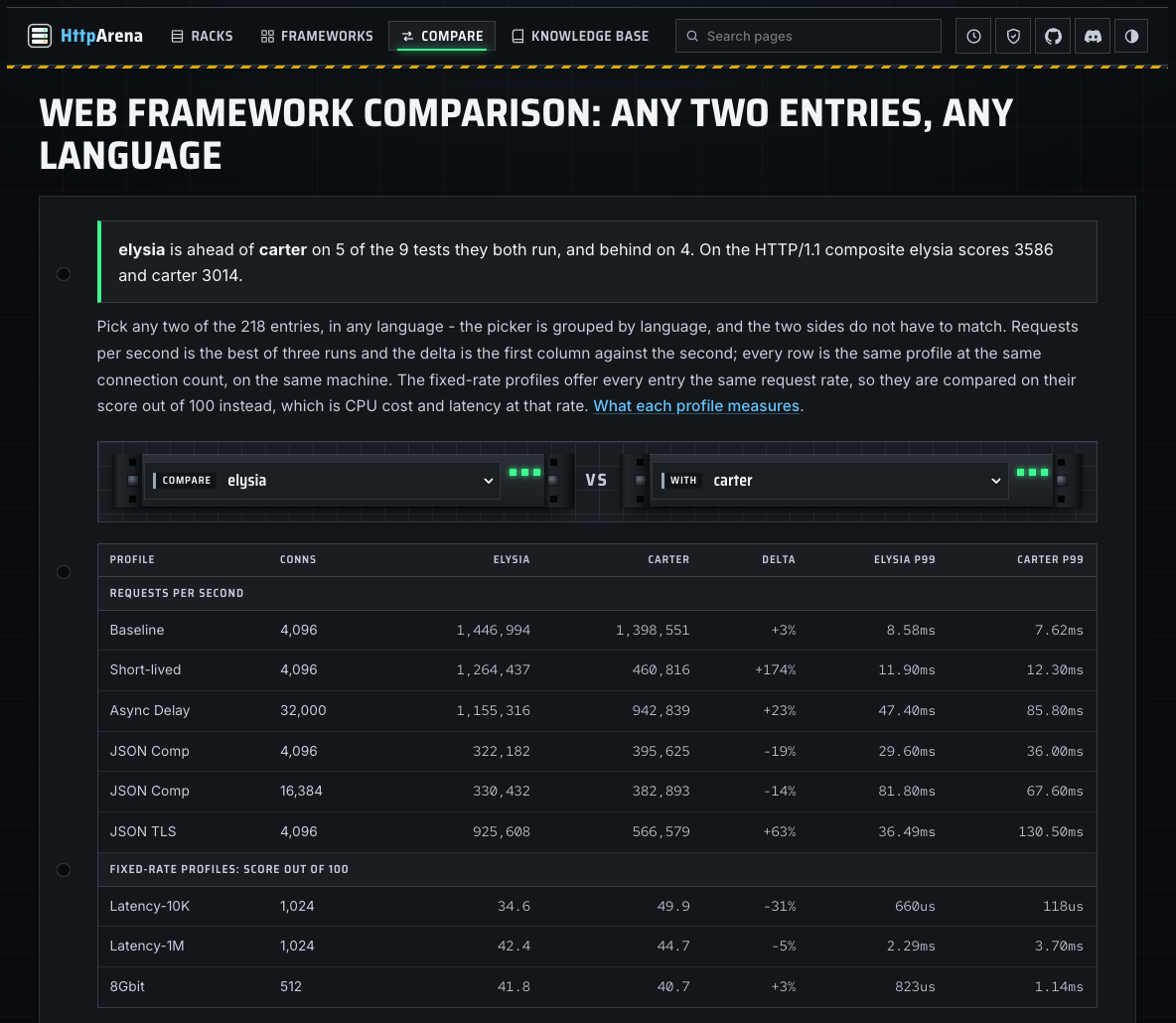
Here are the key HTTP/1.1 throughput profiles (each cell lists requests per second, p99 latency, and RAM; the throughput leader is in bold):
| Profile | Elysia | Carter (.NET) |
|---|---|---|
| Baseline (4,096 conns) | 1,446,994, 8.58ms, 1.9 GiB | 1,398,551, 7.62ms, 344 MiB |
| Short-lived (4,096 conns) | 1,264,437, 11.90ms, 1.9 GiB | 460,816, 12.30ms, 117 MiB |
| Async Delay (32,000 conns) | 1,155,316, 47.40ms, 5.8 GiB | 942,839, 85.80ms, 1.4 GiB |
| JSON Comp (4,096 conns) | 322,182, 29.60ms, 2.2 GiB | 395,625, 36.00ms, 573 MiB |
| JSON Comp (16,384 conns) | 330,432, 81.80ms, 2.5 GiB | 382,893, 67.60ms, 856 MiB |
| JSON TLS (4,096 conns) | 925,608, 36.49ms, 1.9 GiB | 566,579, 130.50ms, 878 MiB |
Notice that Carter takes both compressed JSON profiles (+23% at 4,096 connections) and edges out Elysia on Baseline p99 (7.62ms vs 8.58ms), while using 3x to 6x less memory across the board.
Now look at Latency-10K (a steady 10,000 requests per second over 1,024 connections), which is closer to a typical production workload than a saturation test:
| Latency-10K | Elysia | Carter (.NET) |
|---|---|---|
| Score | 34.6 | 49.9 |
| p99 | 660us | 118us |
| CPU | 857.9% (~8.6 cores) | 130.2% (~1.3 cores) |
| RAM | 1.7 GiB | 153 MiB |
On Latency-1M (1 million req/s fixed rate), Carter also finishes #2 of 86 frameworks using 180 MiB of RAM compared to Elysia's 2.1 GiB.
Why Both Results Are True
The Elysia entry runs 64 Bun worker processes (one per core on the 64-core test machine). Carter runs one multi-threaded Kestrel process. At saturation, 64 independent processes scale well for I/O-bound HTTP/1.1 requests. At a steady 10,000 requests per second, you are still paying for 64 heaps and 64 event loops: roughly 6.6x the CPU and 11x the RAM for a higher p99 latency.
That efficiency number is what shows up on a cloud bill. Containers are sized by CPU and memory, not peak throughput on a 64-core box. In production you would run Elysia with a smaller worker count rather than 64, so treat the exact multiple with caution, but the architectural difference holds: one multi-threaded process with a shared heap is cheaper at steady load than a cluster of single-threaded processes.
(HttpArena also benchmarks bare aspnet-minimal-11 at 2,828 composite -- within ~6% of Carter's 3,014 -- confirming that Carter adds negligible overhead on top of Kestrel.)
What Other Benchmarks Say
The dunx benchmark (September 9, 2026) pins both servers to a single worker with 64 connections, removing the multi-process factor. It compared Elysia 1.4.29 on Bun 1.4.2 against ASP.NET Core 10 Minimal APIs:
| Test | Elysia | ASP.NET Core 10 |
|---|---|---|
| Small JSON | 122,220 req/s, p99 1.010ms | 105,833 req/s, p99 0.795ms |
| JSON body validation | 80,372 req/s, p99 1.520ms | 77,560 req/s, p99 1.097ms |
| Redis + Postgres | 27,741 req/s, p99 3.516ms | 21,355 req/s, p99 3.940ms |
Even on a single worker, Elysia stays ahead on throughput while ASP.NET holds tighter p99 latency on the first two tests.
Read the fine print
HttpArena is in its Alpha round (results captured 2026-11-22). The carter entry runs Carter 10 on ASP.NET Core, and the dunx numbers test .NET 10. Treat any public benchmark as a directional signal and measure your own workload.
Beyond the Benchmarks
Here is how the two stacks compare beyond raw throughput:
| Where Elysia / Bun shines | Where .NET + Carter shines |
|---|---|
Runs .ts directly with no build step | Type metadata at runtime; the record is the schema |
| Eden gives zero-codegen TypeScript client types | OpenAPI + Scalar works for every client language |
bun build --compile --target cross-compiles a single binary | Native AOT produces small, fast-starting native binaries |
| Runtime, package manager, and test runner in one tool | Kestrel speaks HTTP/1.1, HTTP/2, HTTP/3, and gRPC out of the box (the HttpArena Elysia entry is HTTP/1.1 only) |
| WebSockets built in | WebSockets built in on both sides |
| Worker isolation by default (harder to corrupt shared state) | True shared-memory threads: one in-memory cache across all cores, no IPC for CPU-bound work |
So which one?
If you're coming from Express or Nest.js on Node.js and raw throughput is the bottleneck, Elysia on Bun closes most of the gap with .NET. If your cloud bill is driven by steady-state CPU and RAM per container, or you need CPU-bound work with shared in-memory state, or HTTP/2, HTTP/3, and gRPC, .NET still comes out ahead. If you're a TypeScript team in a monorepo and want end-to-end types without codegen, Elysia is a strong choice.
Packaging for Deployment
FROM oven/bun:1 AS app
WORKDIR /app
COPY package.json bun.lock* ./
RUN bun install --frozen-lockfile
COPY src ./src
EXPOSE 3003
CMD ["bun", "src/index.ts"]

# From src/typescript/elysia-app
# ✅ docker buildx build \
# -t ts/elysia-web-api .# Build layer
FROM mcr.microsoft.com/dotnet/sdk:11.0 \
AS build
WORKDIR /app
COPY webapi-carter.csproj ./
RUN dotnet restore
COPY . ./
RUN dotnet publish -c Release \
-o /app/published-app
# Runtime layer
FROM mcr.microsoft.com/dotnet/aspnet:11.0
WORKDIR /app
COPY --from=build /app/published-app ./
EXPOSE 3004
ENTRYPOINT ["dotnet", "webapi-carter.dll"]
# From src/csharp/webapi-carter
# ✅ docker buildx build \
# -t cs/carter-web-api .There is no tsc step on the Bun side: it executes TypeScript directly, which means the container ships source files alongside the Bun runtime.
Both ecosystems can also compile to a single self-contained executable:
# Cross-compiles to Linux from macOS
bun build --compile \
  --target=bun-linux-arm64 \
src/index.ts --outfile server# Needs <PublishAot>true</PublishAot>
# Build on target OS (e.g. Linux / Docker)
dotnet publish -c Release -r linux-arm64bun build --compile bundles your code and the Bun runtime (including the JavaScriptCore JIT) into one file; on our sample it came out at 55 MB. The --target flag cross-compiles, so you can build a Linux binary directly from macOS. .NET Native AOT takes the opposite approach: your code compiles ahead of time to native machine code with no JIT and no warm-up, giving fast cold starts (cross-OS builds run on the target OS, such as a Linux container).
AOT and Carter don't mix
Native AOT trims any code it can't statically prove is reachable, which breaks reflection-based discovery. AddCarter() scanning the assembly for ICarterModule falls into that category, as does Scrutor scanning for handlers (see Reflection). For Native AOT, switch to WebApplication.CreateSlimBuilder, add a source-generated JsonSerializerContext, and map your MapGroup routes directly. You give up automatic module discovery in exchange for Native AOT startup and footprint.